We might have caught our first glimpse at the Google Pixel 4 out in the wild, after a phone looking very similar to the one Google teased last week was spotted being used in London.
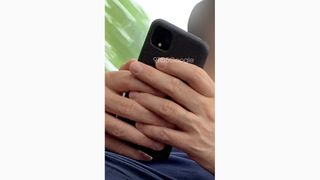
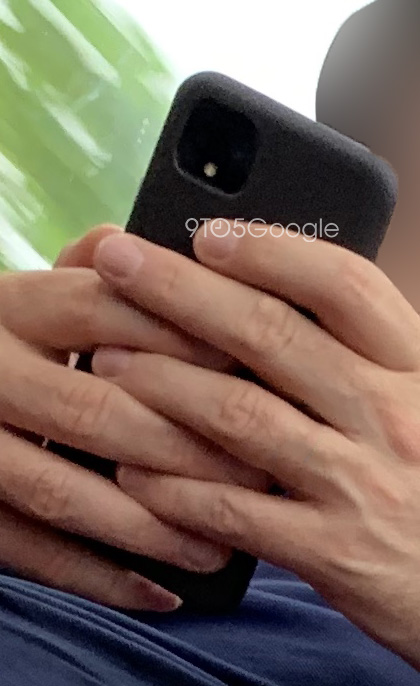
An image of the phone was shared by 9to5Google – you can see the square rear camera array on the back and... that's about it. The snap doesn't really tell us anything new about Google's upcoming handset.
The phone does appear to have a large front-facing bezel at the top of the display, the anonymous tipster who took the phone noted, which we think is going to be housing a dual-lens camera.
And the handset looks as if it's wrapped up in one of those official Google Pixel fabric cases that we've seen appear with previous Pixel launches as well.
Does this look like the Pixel 4 to you? (Image credit: 9to5Google)
We're bracing ourselves for a host of Pixel 4 leaks between now and October, which is the month when we're expecting the next Google flagship to be officially announced.
Even Google is getting involved with the leaks this time around, posting a photo of the upcoming handset on Twitter. The square design for the rear camera is now confirmed, though we're not sure yet exactly what kind of optics it's carrying.
There has been talk of a "spectral sensor" on board the Pixel 4, which would be able to sense hand gestures above the phone, and possibly let users control the device without touching the screen.
Apparently the phone is going to come carrying a Snapdragon 855 chipset and 6GB of RAM too, putting it on a par performance-wise with some of the best phones of 2019. We should get all the details in a few months.
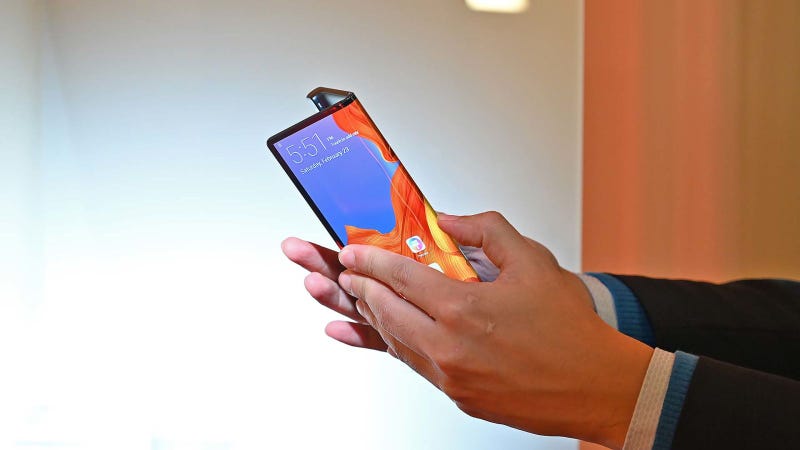
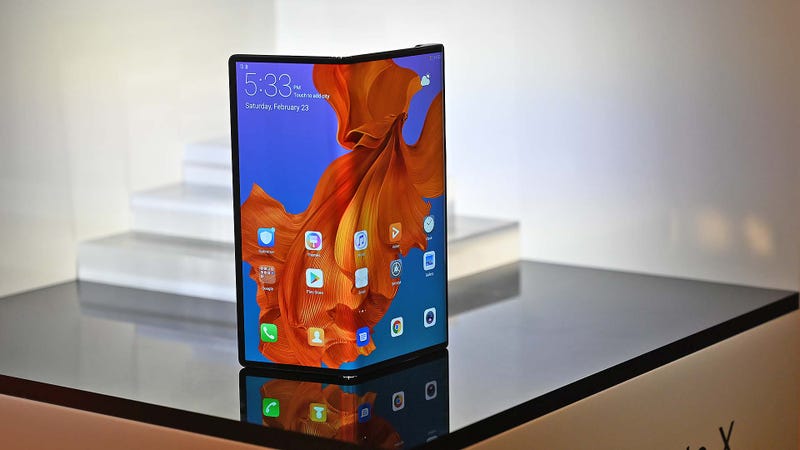
Back at Mobile World Congress in February, Huawei said the Mate X would go on sale this June. However, after seeing the response to the Galaxy Fold’s failed launch, in interviews with the Wall Street Journal and CNBC, Huawei said that it has now decided to take a more “cautious” approach.
Advertisement
A spokesperson for Huawei told CNBC, “We don’t want to launch a product to destroy our reputation.” Instead, Senior Vice President Vincent Peng told WSJ, Huawei will release the Mate X “as early as we can.”
For a phone that’s slated to start at 2,300 euros (around $2,600) and come with 8GB of RAM, 512GB of storage, support for 5G, and that all-important 8-inch foldable screen, postponing the Mate X’s launch to make sure any kinks have been addressed before it goes on sale is certainly a prudent decision. But at the same time, I have to wonder why, on a product this important, Huawei wasn’t already putting out the best possible device. Of course, the same can be said of Samsung, whose delay of the Galaxy Fold means Huawei no longer has to rush out of the gate.
Advertisement
Photo: Sam Rutherford (Gizmodo)
At least it seems the Mate X’s release won’t be effected by the U.S. government’s recent decision to place Huawei on the Entity List, which prohibits U.S. companies from supplying good or services to organizations seen as a national security risk.
Huawei told CNBC that because the Mate X was announced before being added to the U.S.’s Entity List, it will still be able use Android as its primary OS. This stands in contrast to the recently announced Honor 20 Pro, which has now been delayed indefinitely because of Huawei’s inability to license Android for use on future phones.
Advertisement
Still, now that this year’s two most important foldable phones have been delayed, it feels like the whole bendable phone trend has suffered a serious setback. But in the end, these delays may simply mean consumers end up with more reliable foldable devices in the future.
Pixel leak season was just getting off to a strong start this week, and then Google shockingly posted an official image of the device. Now that that cat is out of the bag, a tipster for 9to5Google has spotted what definitely looks like a Google Pixel 4 in the wild, and it lines up directly with Google’s design.
The best gifts for Android users
The below images, shared with us by a tipster who will remain anonymous, show the device with a rear camera array and placement that’s identical to Google’s official design. We’re fairly confident that this is indeed a real-life Pixel 4.
Since we already know the official design, these images don’t provide us with a ton of new information, but we can see what looks to be a microphone cutout on the top of the device. Presumably, this may be the XL model given the size in the user’s hands. The phone is clearly sitting in a case as well, and it appears to be a fabric design not unlike Google’s official cases that it sells for Pixel 2, 3, and 3a.
Seeing a Pixel 4 in the wild doesn’t come as much of a shock, as this is far from the first time a Pixel has leaked in this exact way. The original Pixel was spotted in use on a train, and the Pixel 3 XL’s notch gave it away in public ahead of launch as well.
Our tipster further shared that the device was spotted in London, but no other images were taken of the device. They were able to get a quick peek at the front of the device and confirmed that the rumored “forehead” did indeed seem large and still had the two front facing cameras from last year’s model.
The best promotional item we’ve ever got at a gaming event was a The Last of Us-branded brick-shaped stress reliever, so that puts into perspective just how awesome Cyberpunk 2077’s giveaway at E3 2019 is. The incredible Samurai jacket – which is fully reversible – is selling on eBay for as much as $450, which is incredible.
But developer CD Projekt RED has implored fans not to pay the premium, as it intends to sell a version of the jacket on its own website – and while it hasn’t set a price yet, it won’t be charging anywhere near $400 for the item. How much would you pay for one of these tops? Wait patiently for an official listing in the comments section below.
Apple’s iOS 13 looks like a fantastic update. It includes a real solution to robocalls, privacy improvements, Android-style power user features, and many fixed annoyances. After spending my smartphone years with Android and Windows Phone, now I want an iPhone.
A Real Solution to Robocalls
Apple
Robocall-blocking is the best new feature in iOS 13. The “Silence unknown callers” option solves the biggest annoyance of owning any phone at all. With this feature turned on, your iPhone will check the incoming call against numbers in your Contacts, Mail, and Messages. If it finds a match, your phone will ring. If it doesn’t, the call goes straight to voicemail.
Robocalls are a modern technological plague that seemingly touches everyone. The best advice for handling them is to stop answering your phone. One of the main issues with that advice is you still get interrupted by your phone ringing, fighting for your attention for a call you don’t need. It takes up your iPhone’s entire screen, too.
If the only new feature coming to iPhones were Silence Unknown Callers, that would be enough reason to switch. But isn’t the only feature. There’s a lot more than that.
Apple Builds In Privacy Features That Google Won’t
Apple
It seems like everybody is tracking you all the time. Sometimes apps request location tracking whether or not the app needs it. And even apps that have a legitimate use for your location, like providing weather reports, often track you when you aren’t actively using the app and then sell your data later.
Preventing that behavior is challenging too. You can disable all location tracking, but then some of your apps will be useless (like weather apps). Or, you can manually enable and disable location tracking each time you use an app. But that requires digging through a long list of settings, and that’s just cumbersome.
If location tracking bothers you, Apple has you covered. Soon you’ll be able to give an app permission to check your location just once. You can already only let an app track your location while you’re using it. If you’ve given an app permission to track your location and it’s doing so, your iPhone will notify you—complete with a map of the locations the app has tracked—and include an option to change that permission.
And apps that track you through Bluetooth and Wi-Fi without telling you? Apple is putting a stop to that, too. Android doesn’t offer anything close to this level of location security.
It’s not uncommon to see “Sign In with Google” or Sign In with Facebook” buttons on websites and in apps. They’re easy—you don’t have to create another account with another password. But they’re not very private. When you use that option, you agree to hand over information to a company you may know taken from your accounts. Google or Facebook learns more about what you’re doing, too.
Apple’s solution is its own sign-in service: Sign in with Apple. But this one doesn’t track you, and it doesn’t hand out your data. Apple doesn’t collect much data on you to begin with; that’s not the company’s business model.
When you sign in with Apple, you can either hand over your name and Apple associated email or, for even more privacy, a randomly generated email that forwards to you. Sign in with Apple gives you the convenience of fast account creation while maintaining your confidentiality. Both from Apple and the companies asking for accounts.
Android Power User Features Come to iPhone
Apple
The competition between Android and iPhone sometimes feels like the battle between Coke and Pepsi. Both are excellent, and much of it is just personal preference. But Android and iPhone are more alike than some people are willing to admit—and they’re becoming more alike with every iOS and Android operating system release.
Yet for all the similarities the two operating systems have, some of the differences are huge. It took forever for iPhone to get third-party keyboard support, and to be frank; it’s still not as seamless as Android’s keyboard options.
If you like swiping on your keyboard, Apple is adding a new QuickPath option that lets you swipe to type. That’s one less reason to use a third-party keyboard in the first place.
You can’t customize the look of an iPhone as much as you can Android, and that may always be true. But if you find yourself removing all your widgets, and placing your most used apps in easy to reach places and folders, the look isn’t all that different from an iPhone. And Apple is adding a new beautiful dark mode option in iOS 13. Dark mode may not be better for your eyes than a light theme, but it sure does look nice. (Android is getting a dark mode this year with Android Q, too—see how similar these operating systems are getting?)
And while it took too long to get proper Near-Field Communication (NFC) support, Apple is embracing it wholeheartedly now. If you’re using an iPhone XR or XS, you’ll be able to launch shortcuts from an NFC tag. Shortcuts are a great way to automate tasks and, combined with NFC tags, the possibilities seem endless. In the past, we’ve used NFC tags in a car to start playing music from a playlist and pull up directions to home on Android. Now you’ll be able to do the same with an iPhone.
Like the iPad, the iPhone is getting proper external drive support. Soon you’ll be able to plug a USB drive into an iPhone (with an adapter) and access files and photos. It’s a small thing, but that’s precisely the point. The total of all these small changes is more than the individual parts.
iOS 13 Fixes So Many Small Annoyances
Apple
There’s a lot to love for anyone solidly in the iPhone camp too. This update addresses so many small annoyances. Safari, for instance, will automatically close tabs for you based on time settings. If you’ve ever opened the tabbed view of your mobile browser only to find dozens of tabs from eons ago, you’ll appreciate the concept of tabs that close after a day or week of disuse. Hopefully, every browser borrows this idea.
And speaking of borrowing, much like Android, iOS 13 lets you delete apps directly from the App Store’s update list. That’s important on iPhones (which lack an app drawer) since currently, you have to hunt down their locations on your iPhone’s home screens.
Any iPhone user that relies on the reminders app will appreciate better natural language support. Typing something like “eye doctor at 6 pm” will create a properly scheduled reminder. Before, the reminders app would create an appointment with that title.
Lost and stolen phones are another problem we all face, regardless of OS. Apple has a great solution for it, and it’s born out of another product: Bluetooth trackers. Products like Tile and Trackr promise to help you find your stuff through crowdsourcing. The idea is your tracker can contact you by relaying through other closer trackers. The problem is that the crowd doesn’t exist.
Well, Apple definitely has a crowd to work with. So iOS 13 brings that crowdsourcing to the “Find My” (formerly Find My Phone) feature on iPhones. Your phone will contact you via Bluetooth through other people’s iPhones and iPads. No matter where your device is, there’s likely to be a close one to use. And, lest you think that goes against the promise of privacy, Apple included really clever cryptography so only you can track your phone, not even Apple can get to the data.
If you watched the keynote, you might have noticed something strange with all the speakers. They were rushing. From the speeches to feature demonstrations, everything felt fast.
At the end of the presentation, it was clear why WWDC’s speakers felt so rushed. Apple had a lot to announce—and Apple didn’t even have time to cover every feature found in iOS 13. This update looks like the best new version of iOS in years.
The second half of the year will witness the debut of several highly-anticipated flagships, and while everybody knows that Apple, Samsung, and Google are likely to unveil their new high-end models, few specifics are available on the actual launch dates.
Today, however, serial leakster Evan Blass provides us with a closer look at the expected launch date for three of the most exciting releases this year: iPhone 11, Galaxy Note 10, and Pixel 4.
Samsung will be the first to take the wraps off a flagship in late August, followed by Apple in the second half of September.
Apple typically unveils new-generation iPhones in September, so the timing isn’t necessarily surprising, albeit it does provide us with some hints as to when the iPhone 11 could go on sale.
Guessing the iPhone 11 launch date
iPhone 7 was launched on September 16, 2016, while iPhone 8 hit the shelves on September 22, 2017. iPhone XS was released on September 21, 2018.
Given the sales typically start on Friday, there are two options for Apple when it comes to the next-generation iPhone, namely September 20 and September 27. Both are in the second half of September and align with the timeline leaked by Evan Blass.
Keep in mind that the dates here concern the day when these devices will go on sale, so the unveiling could actually take place one week or so before. The calendar is based on information included by Verizon in its marketing calendar for the second half of 2019.
It goes without saying that a certain amount of skepticism is required when reading these dates, albeit most of them align with the previous expectations regarding the launch of new flagships this year.
It's been more than a year since Samsung last updated its Fit line of activity-tracking bands, and it's high time for a refresh. After first announcing the new Galaxy Fit in February alongside the new Galaxy S10 and Galaxy Watch Active, the company is finally ready to roll it out in the US. Starting today, you can get the Galaxy Fit for $100. That puts it in direct competition with the Fitbit Inspire HR, which launched earlier this year for the same price.
I've barely had the Galaxy Fit for a day, and I'm already impressed. It tracks a comprehensive suite exercises (about 90, according to Samsung), as well as your heart rate, sleep and stress levels. You can use it while swimming (though I haven't), install widgets to track your nutrition or daily schedule and receive notifications from your phone.
Because I often think of gadget novices like my mom when I test fitness bands like this, I'm always on the lookout for ease of use. I don't have the time to sit on the phone with my mom, who's halfway around the world, to teach her how to set her steps goal or create custom quick replies.
Samsung's interface is so simple it's almost fool-proof: Just keep swiping sideways from the home screen to scroll through pages that show your daily progress, start a workout, measure your stress, track your sleep and display your notifications. On each page, you can slide up and down to see more. You can also press the button on the left to go back to the home screen and long press it to quickly start a workout.
The Fit also automatically tracks when you've started to move, and is supposedly smart enough to recognize when you're on a treadmill or an elliptical. This way, you won't have to struggle with swiping through the watch with sweaty hands to start another workout -- just hop off one machine and move on to the next, and the Fit is supposed to know. I haven't tested this out yet, though, so can't vouch for how well it works.
What I can say is how attractive Samsung's colorful, responsive Tizen-based interface is, especially compared to Fitbit's kinda laggy, black-and-white OS. But I gotta say, I do prefer the bigger display on older Fits and the Galaxy Watch Active.
The Fit's features are wrapped up in a comfortable, no-nonsense band that feels sturdy enough to withstand being knocked around while I'm rummaging through my purse. And aesthetically, it looks a lot more like a Fitbit than the last-generation Fit 2 Pro, which was wider and had a bigger screen.
Samsung is promising up to a week's battery life with the Fit, which seems like a reasonable estimate given the performance of its previous fitness bands. But since I've only had this thing about a day, I can't verify that claim yet. Still, for just $100 the Galaxy Fit might just appeal to casual users who want a simple, straightforward experience.
Gallery: Samsung Galaxy Fit press pictures | 10 Photos